

Apple Silicon has been renowned for its high performance and low power consumption since the release of M1. This article will discuss the behavior of the M2 chip when running Resident Evil Village with passive cooling condition.
Platform: MacBook Air M2 16+512 8GPU, tested under about 23°C
Tool Introduction: A self-created Python program to visualize logs from powermetrics, including frequency, power, and utilization over time. The powermetrics grapher can be found here.
Sampling Condition
The graphical settings were adjusted to maintain a smooth frame rate (approximately 60fps), and gameplay continued for about 13 minutes. Although due to the absence of an FPS counter, the definition of "smooth" remains somewhat subjective, this should not significantly impact the thermal performance analysis.
Power
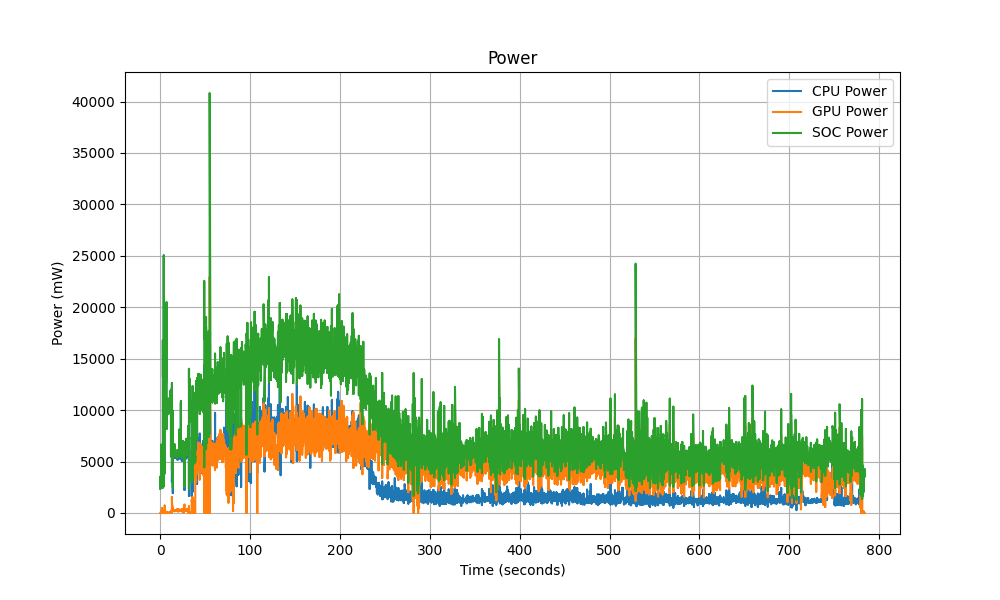
For the first five minutes, the system operated at full performance, with SoC power consumption exceeding 15W. However, after reaching thermal limits, the system began throttling, reducing total SoC power to around 6~7W for the remainder of the test. During this throttled state, the GPU consumed approximately 5W, while the CPU was limited to just 1W. Despite initial equal power distribution between the CPU and GPU, the system appears to prioritize GPU performance once thermal throttling kicks in, ensuring better game performance.
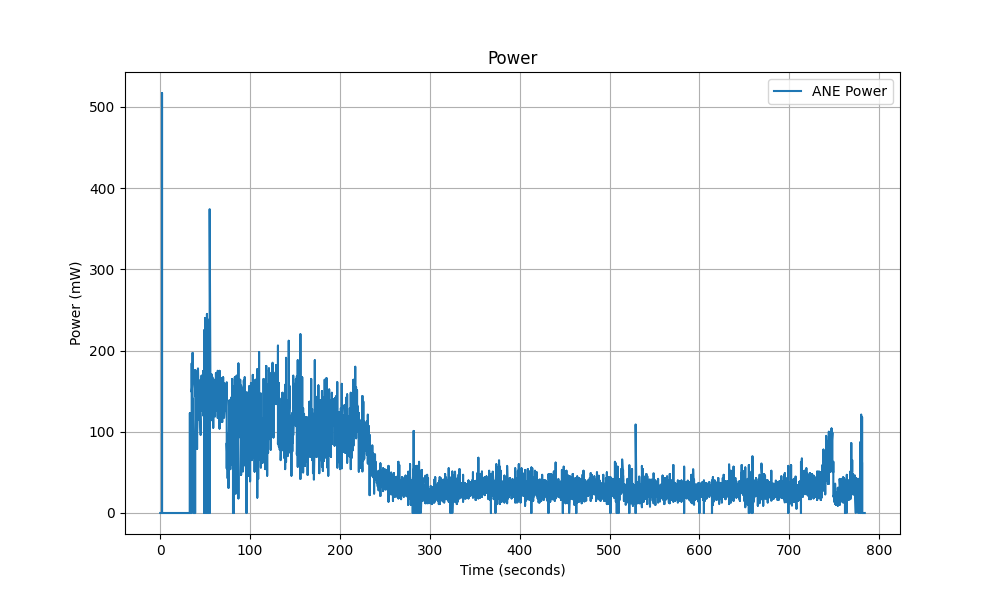
The Apple Neural Engine (ANE) is utilized only when MetalFX is set to "Quality". Disabling MetalFX or selecting the "Performance" mode won't activate ANE. It is unclear whether this is a general optimization strategy or a decision specific to Resident Evil Village.
With the "Quality" option enabled for MetalFX, the Apple Neural Engine was activated. The neural engine initially consumed around 130mW, which later dropped to about 40mW after thermal throttling. ANE power usage seems correlated with FPS, as a separate test with lower graphical settings showed increased ANE power consumption. However, ANE power usage in gaming remains relatively low. For comparison, enabling the camera can push ANE power to 3~4W; AI-intensive tasks like runnng stable diffusion with Drawthings can push it up to 7~8W.
Frequency
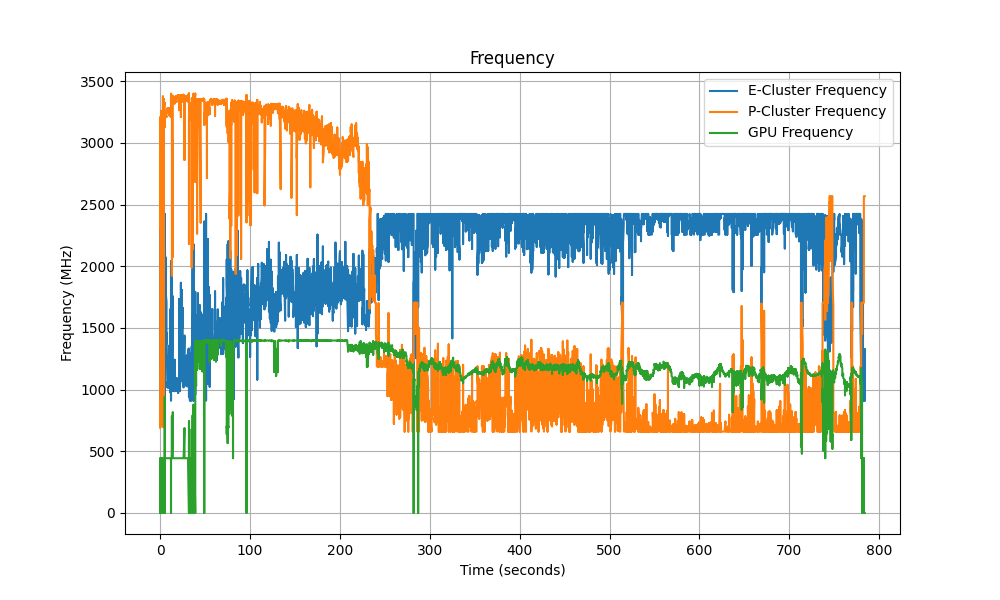
The frequency graph provides a clear illustration of the impact of thermal throttling.
Initially, the P-cores operated at high frequencies but dropped significantly after five minutes. As P-cores went offline due to overheating, the E-cores ramped up to their peak frequency of 2.4GHz, sustaining the game's performance. Notably, despite the CPU consuming just over 1W under thermal throttling, the game remained playable, which again proved the impressive efficiency of Apple's E-cores.
In contrast, GPU frequency remained relatively stable throughout the test, staying above 1.1GHz and receiving the majority of power allocation. In the "Game Mode", Apple appears to prioritize maintaining GPU performance over CPU performance.
Utilization
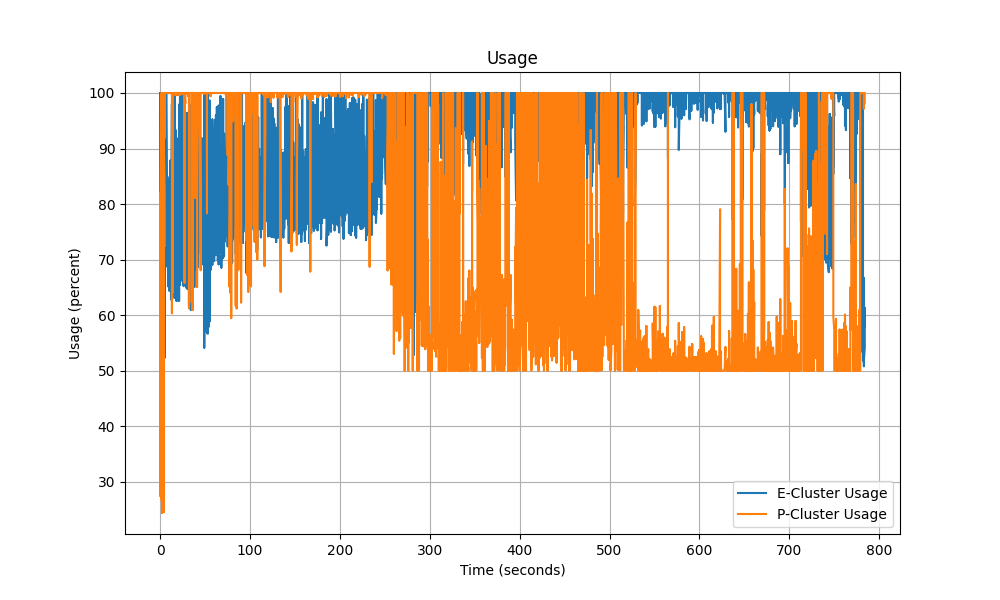
Consistent with the frequency graph, P-cores were fully utilized during the initial phase but went offline when the laptop reached its thermal compacity. Meanwhile, E-cores took over and reached full utilization. Although the overall P-core utilization graph may indicate around 50% usage in the throttled state, individual P-core activity should be just about X%.
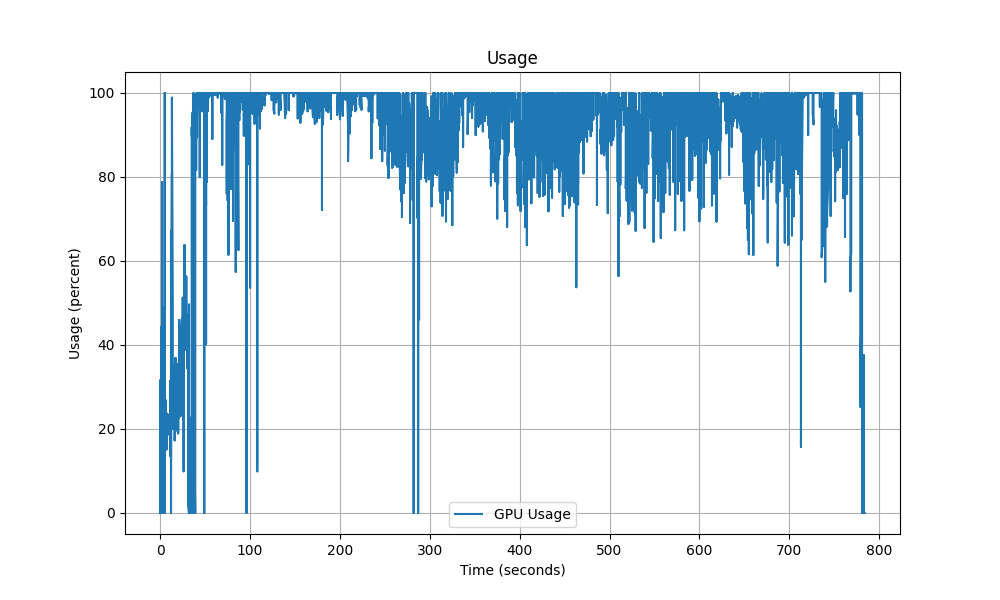
Full usage of GPU, nothing surprising.
Conclusion
This analysis discusses how Apple Silicon manages performance under continuous heavy workloads and passive cooling. The data reveals that the MacBook Air M2 can sustain high performance for about five minutes before it hits the thermal capacity of the machine. Once throttling begins, E-cores take on most of the computational load while consuming minimal power, but the whole SoC can still deliver acceptable performance.
For graphically demanding applications, the system prioritizes GPU performance, ensuring smoother gameplay even under thermal constraints.
Although this analysis is not a professional benchmark with control variables, it can offer an interesting glimpse into Apple's thermal management strategies under extreme conditions.
Comments NOTHING