

This article shares an experience troubleshooting an authentication issue with GitHub. For some unknown reason, the GitHub domain was resolving to localhost, which made it impossible to push or pull any code.
It took me nearly a whole day to figure out the root cause. Since this issue was both frustrating and time-consuming, I think it's worth documenting.
Background
Around April 2025, when I tried to push code to my Github repository, it began asking for a password. It's known that GitHub had deprecated password-based authentication long ago in favor of SSH keys. I was certain I had already added my public key to GitHub, so there must be something else wrong.
Analysis
GitHub provides an official way to test SSH connections using:
ssh -T [email protected]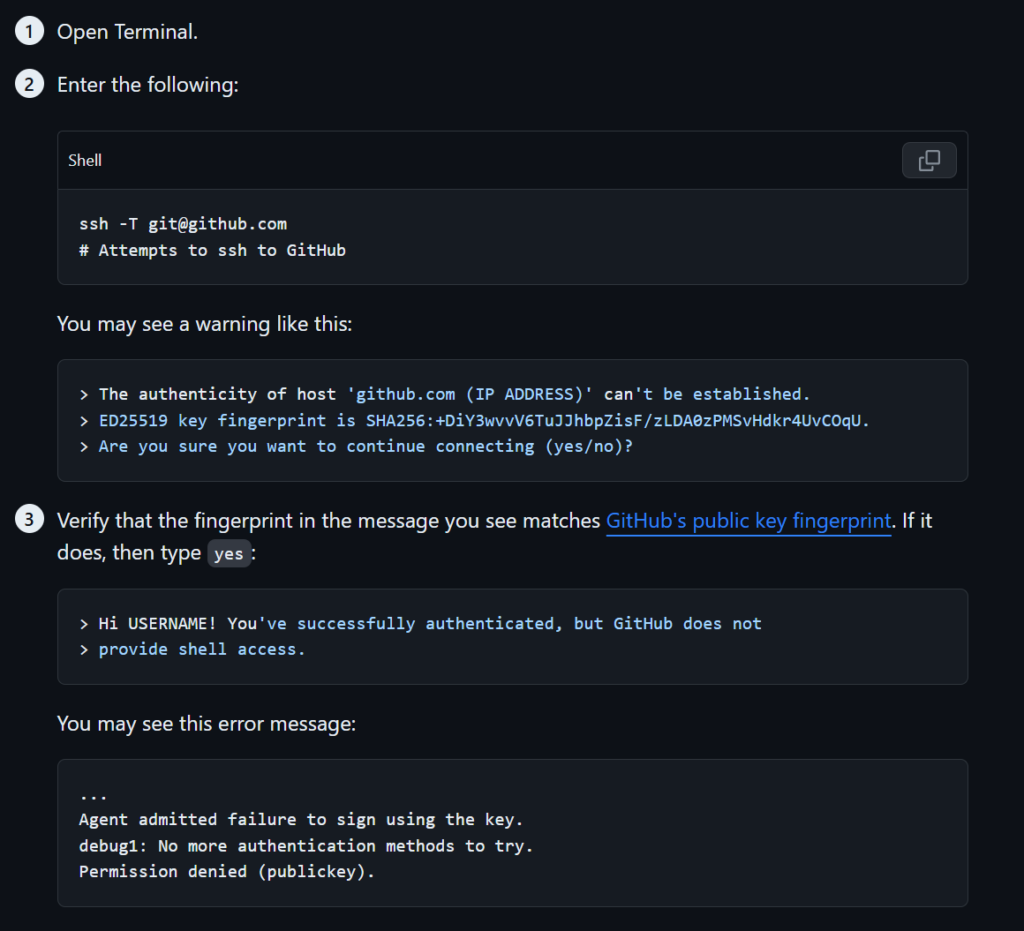
When running that command, I got the following output:

Clearly, there were problems when connecting to the whole domain instead of on specific repos.
To dig deeper, I used the debug command:
ssh -Tv [email protected]This command prints all the steps involved in the SSH connection. Here's what I got:
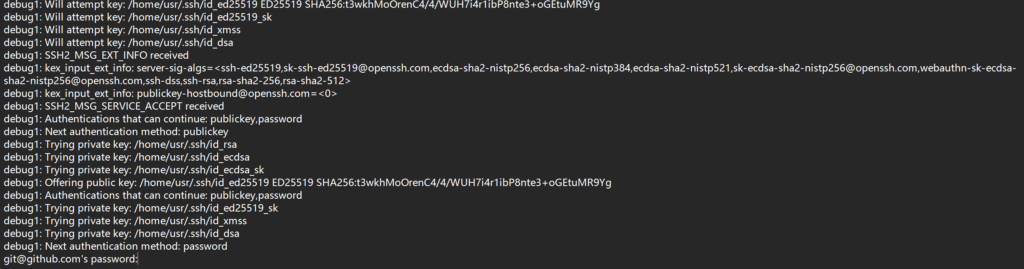
The output showed that my SSH client recognized the private key and sent it, but got no response from GitHub.
For comparison, I also tested the connection to the University of Waterloo server:
That connection worked just fine. The UW connection had a message about accepting the key which Github connection doens't have, which confirmed the problem was specific to GitHub, not my SSH client setup.
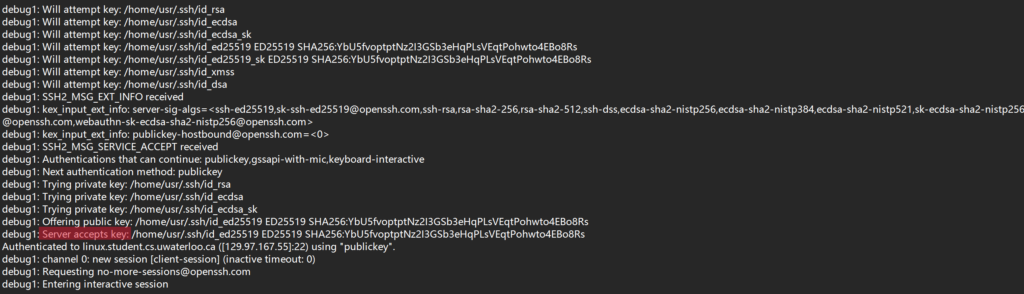
So maybe it was a connection issue?
Next, I tried:
ping github.comHere’s what I saw:

At first, I didn’t pay attention to the extremely low latency. It looked normal at a glance. I repeated all the above steps again and again with no progress — until I finally realized that the latency was suspiciously low, even lower than from local devices. Then I noticed it was actually resolving to localhost.
The extremely low latency revealed the reason: GitHub's domain was being redirected to localhost. No wonder it never responded to my SSH key — the request wasn’t reaching GitHub at all. And of course, I didn’t have a user named "git" on my local machine, so authentication always failed.
Solution
It was clearly a DNS resolution problem. So the fix was to set a proper DNS server.
The corresponding config file is /etc/resolv.conf. It's managed by NetworkManager and defines the current DNS settings.
Mine showed a local network device as the DNS server:

Since that wasn’t working, I decided to change it to Google's DNS server:
8.8.8.8Note: resolv.conf gets reset by NetworkManager every time it restarts, so we need to make the DNS config persistent. Here are the 3 steps I followed:
1. Edit /etc/NetworkManager/conf.d/dns.conf (create the file if it doesn't exist):
[main]
dns=null
2. Edit /etc/NetworkManager/conf.d/dns-servers.conf (also create if missing):
[global-dns-domain-*]
servers=::1,127.0.0.1,8.8.8.8
3. Restart NetworkManager:
sudo systemctl restart NetworkManagerAfter doing this, the GitHub connection started working again.


Finally
The hardest part was identifying that the issue was with DNS resolution. When I searched "GitHub requires password even with SSH configured", none of the results mentioned DNS as a possible cause — not even ChatGPT.
I tested all the usual suspects from online discussions: HTTPS vs SSH repos, r/w permissions, firewall settings, etc. but none of them works. Fortunately, I finally noticed the abnormal latency and realized that GitHub was pointing to localhost and that revealed the real issue.
Maybe it's worth checking the DNS settings when a system connects to some sites successfully but fails with others, ?
Usually, when I encounter critical issues that go beyond my current knowledge, I would prefer reinstalling the entire system, which often works. But this time, it's lucky that I didn’t want to go that far. Reinstalling the OS always brings a huge time cost to back up and restore everything. Worse, if I didn’t identify the actual cause and solution, I might run into the same issue again in the future, even after a reinstall.
The biggest lesson is that search engines and generative AI can't always solve broad and vague problems unless they are narrowed down with enough precise information. Sometimes, human intuition is still required to explore the corner cases and ask the right questions.
Comments NOTHING